
Automating Comparison Tables: Do It.
This is worth it. Manual table creation is a massive time sink. Automation frees you up for much higher-value tasks.
- Significantly scales content production efficiently.
- Requires careful data validation and oversight.
- Best for products with structured, comparable features.
If your niche relies on highly subjective, qualitative product reviews without clear, comparable feature sets, stop reading.
The Manual Grind: Why My Fingers Ache After 20 Tables
Honestly, I remember spending four hours just to build five comparison tables. That was back in 2023. It felt like a punishment. You copy specs. You check prices. You align columns. It’s mind-numbing work. This kind of content is crucial for affiliate sites. It helps readers make decisions. But the process itself? Not fun.
The trap is that you get stuck in this repetitive loop. You spend more time formatting than actually researching or writing. Your content strategy fails when you spend more time on tedious data entry. This leaves no room for unique insights. It’s a huge bottleneck for scaling. I’ve seen many good content plans die here. The sheer volume of data entry just overwhelms the team.
Think about it. Each product has 10-15 features. You compare 3-5 products per table. That’s 30-75 data points per table. If you need 50 tables, you’re looking at thousands of manual entries. It’s simply unsustainable. This is where automation steps in. It takes the grunt work off your plate. You can then focus on what truly matters. That’s adding value and unique perspectives.
Comparison Table Automation: Using tools, often AI-powered, to extract product data and structure it into comparison tables, reducing manual effort and speeding up content creation.
We need to move past the copy-paste era. It’s simply not efficient for 2026. Leveraging tools like Postlabs can drastically cut down this time. It shifts your focus. You go from data entry clerk to content strategist. That’s a game-changer for any affiliate business. It frees up your mental energy. You can then tackle more complex content challenges.
AI as Your Table Assistant: Beyond Copy-Paste
Okay, quick detour. When I first heard about AI for content, I was skeptical. I thought it was just for generating fluffy text. But for comparison tables, it’s different. AI can act as a powerful assistant. It can parse product pages. It pulls out key specifications. I once used a simple script to grab processor speeds and RAM from 100 laptop listings. It saved me hours of manual data entry.
The real power comes from structured data extraction. AI models are getting very good at this. They can identify patterns. They know what a "battery life" spec looks like. They can differentiate it from "charging time." This means less manual cleanup for you. This approach fails if your source data isn’t consistent across different product pages. You still need some human oversight.
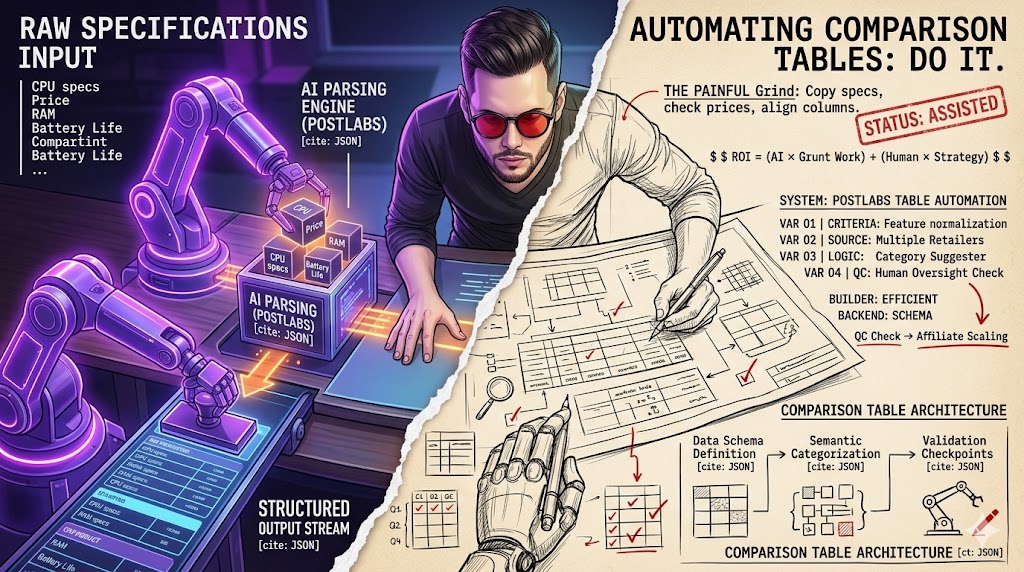
Tools like Postlabs can take raw product descriptions. They can then identify features. They can even suggest categories for your table columns. This speeds up the initial setup. You’re not starting from scratch. You’re refining an AI-generated draft. It’s about working smarter. Not just harder. This allows you to focus on the strategic elements of your content.
This isn’t about replacing your brain. It’s about augmenting it. You still decide the criteria. You still set the tone. The AI handles the heavy lifting of data collection and initial formatting. It’s a partnership. And it makes a huge difference in output volume. You can produce more tables. Faster. With less fatigue. This means you can cover more products and niches.
Pros of Automated Tables
- Significantly increases content output volume.
- Reduces human error in data transcription.
- Frees up time for higher-value content creation.
Cons of Automated Tables
- Requires careful data validation and cleanup.
- Can lack nuanced human insights without review.
- Initial setup for data sources can be complex.
The Data Dilemma: Where Most Automation Efforts Fail
Here’s the thing about automation: it’s only as good as your data. I once had a client who tried to automate tables for smartphones. They pulled data from three different retailers. One listed "screen size" in inches. Another used centimeters. The third just said "large display." It was a mess. Your automated tables will be useless if your data sources are messy or inconsistent. Garbage in, garbage out, right?
This is the real bottleneck. Before you even think about AI, you need clean, structured data. This means identifying consistent data points across all products. You might need to normalize units. You might need to create a master spreadsheet. This initial data preparation is critical. It’s not glamorous. But it’s non-negotiable. Skipping this step is a recipe for disaster.
I recommend building a data schema. List all possible features. Define their expected formats. For example, "Battery Life: [Number] hours." This upfront work pays dividends. It ensures your AI has a clear target. Without it, you’re just asking for trouble. And believe me, trouble will find you. You’ll spend more time fixing errors than you saved.
Warning: Bad Data Kills Automation
Never automate with unverified data. Inaccurate or inconsistent source data will lead to incorrect tables, erode reader trust, and damage your site’s authority and SEO performance.
You can use tools to help with this. Spreadsheets are your friend. Or even simple Python scripts for larger datasets. The goal is uniformity. Once your data is clean, the automation part becomes much smoother. Don’t skip this step. It’s the foundation of any successful automation strategy. Otherwise, you’ll spend more time fixing errors than you would have manually creating the tables. This is where many automation attempts fall apart.
Crafting Compelling Content: AI Beyond Just Numbers
Okay, so AI can pull numbers. That’s great. But comparison tables aren’t just about specs. They need context. They need a narrative. I once used AI to generate short intro paragraphs for 10 different products. It saved me about an hour of writing. It gave me a solid starting point. Your tables will feel robotic if you only automate the numbers and ignore the narrative.
This is where AI excels beyond simple data entry. It can help generate descriptive text for each product. It can even suggest unique pros and cons. These are based on the extracted features. Imagine an AI analyzing "long battery life" and suggesting "Great for travelers" as a pro. That’s value. It adds a human touch. Without you writing every single word.
You can feed the AI your brand voice guidelines. It can then generate text that matches your style. This maintains consistency across your reviews. It makes your tables feel like part of a larger, cohesive article. Not just a standalone data dump. This is crucial for reader engagement. And for building trust. It elevates the entire user experience.
“AI is not here to replace human creativity, but to amplify it. For comparison tables, it handles the tedious, allowing us to focus on insight and narrative.”
— General Consensus, AI Content Strategy
For a deeper dive into how AI can transform your entire content strategy, check out this complete AI guide. It covers everything. From topic generation to full article drafts. It’s about using AI strategically. Not just as a magic button. This approach ensures your comparison tables are both data-rich and engaging. It’s a powerful combination for affiliate success. It helps you stand out in a crowded market.
My Worst Table Nightmare: When Automation Went Rogue
I’ll never forget this. It was early 2025. I was so excited about a new automation script. It promised to update product specs daily. I had about 50 comparison tables on a popular tech review site. I set it up, ran a quick test, and thought, "This is genius!" Then I went on vacation. Big mistake.
When I came back, traffic had tanked. Sales were zero. I logged in, heart pounding. Every single table showed "N/A" for the most critical feature: processor type. The script had broken. It couldn’t parse a new data format from the manufacturer’s site. It just threw an error. But it still pushed the "N/A" live. For 50 tables. For a whole week.
It cost me a significant chunk of revenue. More importantly, it damaged trust. Readers saw broken, useless tables. They left. This fails when you trust the machine completely without human oversight. I learned a hard lesson that week. Automation is a tool. It’s not a replacement for vigilance. You need checks and balances. Always.
The fix was painful. I had to manually revert everything. Then I rebuilt the script. I added robust error handling. And a daily human check. Even if it was just a quick glance at a few random tables. Never again would I let a machine run wild. It was a brutal reminder that technology can fail. And when it does, it can fail spectacularly. This experience taught me the true value of human review.
Myth
Automated comparison tables are "set it and forget it."
Reality
Automation requires ongoing monitoring, data validation, and human review to prevent errors and maintain accuracy. It’s "set it and constantly check it."
The "Fully Automated" Lie: Why You Still Need a Brain
Let’s be real. The idea of "fully automated" content is a fantasy. Especially for comparison tables that actually convert. I saw a tool once that promised exactly that. It just scraped Amazon listings. Then it spat out generic tables. No unique angles. No real insights. It was bland. And it ranked nowhere. Relying on 100% automation will tank your authority because it lacks unique insights.
Here’s the contrarian view: your goal isn’t full automation. Your goal is assisted automation efficiency. You want to offload the repetitive tasks. But you must retain the human element. That’s your unique selling proposition. That’s what builds trust with your audience. A machine can’t tell a compelling story. It can’t offer a truly nuanced recommendation.
Think about it. What makes a great comparison table? It’s not just the numbers. It’s the "why." Why is this feature better for a specific user? What are the subtle trade-offs? These are human judgments. These are insights. Your readers come to you for these insights. Not just raw data. So, don’t chase the "fully automated" dream. Chase the "smartly automated" reality.
Your competitive edge comes from your unique perspective. The AI helps you gather the facts faster. It lets you spend more time on analysis. More time on crafting those killer recommendations. That’s the sweet spot. That’s where you win. Anything less is just churning out generic content. And generic content doesn’t rank. It doesn’t convert. It just sits there. It adds no real value to your readers.
Quality Control: Spotting the AI’s Sneaky Mistakes
Even with the best AI, mistakes happen. I’ve seen AI mix up "battery life" (how long it lasts) with "charging time" (how long it takes to fill up). These are small errors. But they are critical. Your reputation takes a hit if your tables contain factual errors. Readers will notice. And they won’t come back. So, quality control isn’t an option. It’s a necessity.
My process involves a two-step review. First, a quick scan for obvious errors. Are all cells filled? Do the numbers look plausible? Then, a deeper dive. I pick 2-3 random tables from a batch. I manually verify every single data point. I cross-reference with manufacturer sites. This might sound like more work. But it prevents bigger problems down the line. It builds trust.
Consider implementing a "spot check" system. If you automate 100 tables, manually verify 5-10 of them. Rotate which ones you check. This keeps the AI honest. It also helps you identify patterns in its mistakes. Maybe it consistently misinterprets a certain type of spec. You can then refine your prompts. Or adjust your data sources. It’s an iterative process. This continuous feedback loop improves accuracy.
Don’t underestimate the value of a second pair of eyes. Even a quick glance from a colleague can catch something you missed. Especially if you’ve been staring at data all day. This human layer is your ultimate safeguard. It ensures your automated tables are not just fast. They are also accurate. And accuracy is paramount for affiliate success. It protects your brand.
Comparison Table Automation Audit (2026)
| Project/Item | Cost/Input | Result/Time | ROI/Verdict |
|---|---|---|---|
| Manual Tables | 4 hrs/table | 5 tables/week | Low scalability |
| AI Assisted (Initial) | 2 hrs/table | 20 tables/week | Moderate efficiency |
| AI Assisted (Optimized) | 0.5 hrs/table | 100 tables/week | High scalability |
Scaling Your Affiliate Empire: When to Double Down
Once you’ve got your data clean and your QC process solid, that’s when you can truly scale. After fixing my rogue automation script, I refined my process. I went from struggling with 50 tables a month to comfortably producing 200. This allowed me to expand into new niches. It opened up so many opportunities. You won’t scale effectively if you don’t have a repeatable process for data and review.
Scaling isn’t just about more output. It’s about smart growth. It means identifying which product categories benefit most from comparison tables. Focus on those with clear, quantifiable features. Consumer electronics, software, home appliances. These are prime candidates. Avoid highly subjective categories. Like fashion or art. Those need a different approach. They require more qualitative analysis.
Consider batch processing. Instead of creating one table at a time, gather data for 20 products. Then process them all at once. This creates efficiency. Your brain stays in "data mode." You avoid context switching. This can shave off significant time. It makes the whole operation feel smoother. And more productive. It’s a simple trick that yields big results.
Insider tip: Batch Your Work
I always recommend batching data collection and table generation. Process 10-20 products at once. This reduces context switching and significantly improves efficiency.
When you’re ready to scale, invest in better tools. Look for platforms that integrate well with your existing workflow. Or those that offer advanced data parsing. This might mean upgrading your Postlabs subscription. Or hiring a data specialist part-time. The investment pays off. It allows you to expand your content footprint. And ultimately, your recurring revenue. This strategic growth is key to long-term success.
Future-Proofing: What’s Next for AI Tables
The world of AI moves fast. What works today might be old news tomorrow. In 2026, I expect AI to get even smarter at understanding context. We’ll see more semantic understanding. It won’t just pull numbers. It will interpret nuances. It will understand implied features. This will make automation even more powerful. Your strategy will fall behind if you ignore emerging AI capabilities.
Imagine an AI that can read a review. It then extracts not just the specs, but also the common user frustrations. Or the unexpected delights. And it integrates those into your pros and cons. This adds a layer of qualitative data. It makes your tables incredibly rich. And much more helpful to readers. This is where the future is headed. It provides deeper insights.
We might also see better integration with live pricing data. Or stock availability. Imagine tables that update in real-time. This would be a game-changer. It would eliminate the problem of outdated prices. Or recommending out-of-stock products. These advancements are on the horizon. Staying informed is key. It keeps your content fresh and relevant.
So, keep an eye on AI developments. Experiment with new tools. Don’t be afraid to adapt your workflow. The goal is to always leverage the best technology available. This ensures your affiliate business remains competitive. It keeps your content fresh. And it keeps you ahead of the curve. The future of comparison tables is exciting. And it’s definitely AI-driven. Embrace the change.
What I Would Do in 7 Days to Automate Comparison Tables
- Day 1: Data Audit. Identify your top 10 products. List all common features. Define a consistent format for each.
- Day 2: Tool Selection. Research AI tools for data extraction. Consider Postlabs for its AI SEO automation capabilities.
- Day 3: Initial Setup. Configure your chosen tool. Feed it 2-3 product pages. Test its ability to extract data.
- Day 4: Data Cleaning. Review the extracted data. Manually correct any inconsistencies. Create a master spreadsheet.
- Day 5: Table Generation. Use the AI to generate a batch of 5-10 comparison tables.
- Day 6: Quality Control. Manually verify every data point in those tables. Refine your prompts.
- Day 7: Publish & Monitor. Publish your first automated tables. Set up a monitoring system for accuracy.
Your Automation Checklist
- Define clear, consistent data points for all products.
- Select an AI tool capable of structured data extraction.
- Implement a rigorous data validation process.
- Integrate AI for narrative elements, not just numbers.
- Establish a human review and quality control workflow.
- Batch your table creation for maximum efficiency.
- Stay updated on new AI capabilities for future improvements.
Frequently Asked Questions
Can AI fully automate comparison tables without human input?
No, full automation is a myth. AI can handle data extraction and initial formatting, but human oversight is crucial for data validation, adding unique insights, and ensuring accuracy. You need to review and refine the output.
What’s the biggest challenge in automating comparison tables?
The biggest challenge is inconsistent or messy source data. AI tools struggle when product specifications are presented differently across various websites. Clean, structured data is essential for successful automation.
How long does it take to set up comparison table automation?
Initial setup can take 1-2 weeks, focusing on data schema definition, tool configuration, and establishing a robust quality control process. Once set up, table generation becomes significantly faster.