
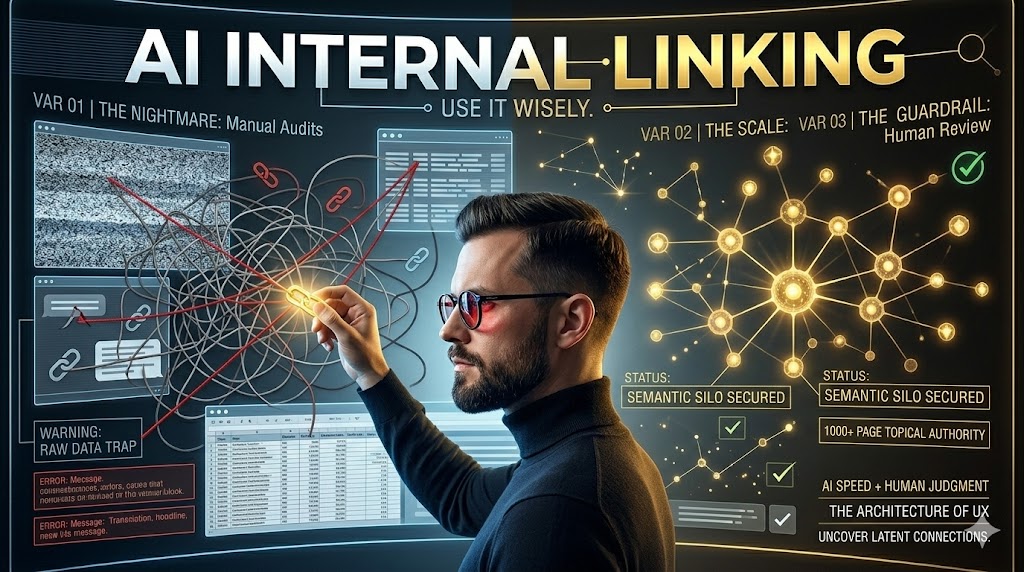
AI for Internal Links: Use It Wisely
This is worth it. AI significantly speeds up internal linking for large sites. It helps uncover opportunities you would otherwise miss.
- Identifies complex, non-obvious link opportunities fast.
- Requires careful human review to prevent errors.
- Ideal for optimizing 1,000+ page content silos.
If your site has fewer than 100 pages, stop reading; this approach is likely overkill.
The Manual Linking Nightmare: Why AI Steps In
I once spent weeks manually auditing a 500-page site for internal links. It was brutal, honestly. I ended up with a spreadsheet that was barely manageable. The sheer scale of a 1,000-page silo makes this task almost impossible by hand. You simply cannot keep track of every relevant connection.
Humans are great at deep dives. We struggle with repetitive tasks across thousands of pages. This is where AI shines. It can process vast amounts of content quickly. Your internal linking strategy fails when you rely solely on manual audits for large sites because you’ll miss most opportunities. You’ll leave valuable link equity on the table. That’s just not smart business.
AI tools, especially those focused on AI SEO automation, can scan your entire site. They identify semantic relationships between pages. This helps you build a stronger, more interconnected site structure. It’s about working smarter, not harder.
Pros of AI for Internal Linking
- Unmatched Speed: Analyze thousands of pages in minutes, not weeks.
- Semantic Accuracy: Discover non-obvious, contextually rich link opportunities.
- Scalable Insights: Easily manage and update linking strategies across huge content silos.
Cons of AI for Internal Linking
- Requires Data Prep: AI needs clean, structured data to perform well.
- Potential for Bad Suggestions: Without guidance, AI can generate irrelevant links.
- Human Oversight Needed: Full automation risks quality; human review is essential.
Prepping Your Data: AI is Only as Good as Your Input
I’ve seen people feed raw, messy crawl data into AI and get absolute garbage out. It’s like asking a chef to cook with rotten ingredients. The result won’t be good. Before you even think about AI, you need clean, structured data. This means a comprehensive site crawl. You also need to understand your topic clusters.
Your AI linking suggestions will be useless if your input data is messy or incomplete. This is a hard truth. You need to identify your core pages, supporting content, and orphaned pages. Use tools to export content, titles, meta descriptions, and existing internal links. This forms the foundation for AI analysis. Don’t skip this step. It’s crucial.
Think about how your content is organized. A well-defined content silo makes this process much smoother. It gives the AI clear boundaries and relationships to work with. Clean data helps the AI understand the intent behind each page. This leads to far better link suggestions.
Content Silo: A content silo organizes related web pages into distinct, thematic groups. This structure boosts topical authority and improves search engine understanding.
Prompt Engineering: Guiding AI to Smart Link Suggestions
I once used a generic prompt for internal linking and got suggestions to link "contact us" from every single product page. Not helpful. It was a waste of time. Your AI will suggest irrelevant links if your prompts are too broad or lack specific constraints. You have to be precise.
Crafting effective prompts is an art. You need to tell the AI exactly what you want. Specify the source page, the target silo, and the type of relationship you’re looking for. For example, you might ask for links from informational content to commercial pages. Or from broad topics to specific sub-topics. This guidance is key.
Consider the user’s journey. What information would they naturally want next? This helps the AI understand context. You can also tell the AI to exclude pages already linked. Or to prioritize pages with high topical authority. For a deeper dive into this, check out this complete AI guide from Postlabs. It covers a lot of ground on prompt best practices.
Beyond Keywords: Uncovering Semantic Link Opportunities
My team used to only link exact match keywords. We missed so much context. We were stuck in an old way of thinking. AI changes this game entirely. It doesn’t just look for exact keyword matches. It understands the underlying meaning of your content. This is semantic analysis at its best.
AI can identify latent semantic indexing (LSI) relationships. It sees connections that a human might overlook. For example, it can suggest linking a page about "sustainable farming" to one about "organic produce." Even if they don’t share exact keywords. You miss valuable link equity if you only look for exact keyword matches. This is a huge trap.
This deeper understanding means more relevant internal links. More relevant links mean better user experience. Better user experience often translates to higher rankings. It’s a win-win. AI helps you build a truly interconnected web of content. This strengthens your overall topical authority. It makes your site a go-to resource.
Myth
Internal links are just for SEO.
Reality
Internal links primarily guide users, improve site navigation, and distribute page authority. SEO benefits are a byproduct of good UX.
The Human Review: Where Experience Trumps Automation
I once approved 200 AI links without a single spot-check. A few were totally off-topic. It was embarrassing, honestly. The AI had made some logical but ultimately unhelpful connections. Your internal linking strategy can backfire if you blindly implement AI suggestions without human review. This is the biggest risk.
AI is a powerful assistant, not a replacement for human judgment. You need to review its suggestions. Check for relevance, context, and user intent. Does the link truly add value to the reader? Is it placed naturally within the content? These are questions only a human can answer effectively.
Think of it as quality control. You wouldn’t ship a product without testing it. Don’t push live hundreds of links without a quick audit. Even a quick pass can catch glaring errors. This ensures your site architecture remains logical. It protects your topical authority. For more on balancing AI and human input, check out a good AI for SEO guide.
Warning: Over-Automation Risk
Blindly implementing all AI-generated internal links is a critical mistake. This can create irrelevant connections, dilute topical authority, and even confuse users, potentially harming your SEO.
Scaling Implementation: Getting Those Links Live
I remember a project where we had thousands of link suggestions. But we had no process to actually add them. They just sat there in a spreadsheet. It was a huge waste of effort and time. We spent two full days just trying to figure out how to get them into WordPress without breaking everything. The dev team was not happy, believe me. This happened because we didn’t plan for the actual implementation step. We just focused on the analysis. The trap is thinking the analysis is the end goal. It’s not. The links need to go live.
Your entire AI internal linking effort is wasted if you don’t have an efficient system to implement the changes. This is a bottleneck for many teams. For smaller sites, manual insertion might work. For a 1,000-page silo, that’s a non-starter. You need a scalable solution. Consider using a CMS plugin that allows bulk updates. Or work with your development team. They can script the changes.
Some advanced Postlabs platform tools offer direct integration. They can push suggestions to your CMS. This streamlines the process significantly. Always test a small batch first. Make sure everything works as expected. This prevents site-wide issues. It saves you a lot of headaches later on. Planning for implementation is just as important as the analysis itself.
“Internal links are the backbone of site architecture and user flow.”
— General Consensus, SEO Community 2026
Measuring Success: Proving Your AI Efforts Paid Off
I once optimized a silo and forgot to track before/after metrics. My boss asked for ROI, and I had nothing. It was not fun. You can’t justify the time and resources spent if you don’t track key performance indicators. This is basic business sense. You need to show that your work made a difference.
Start with a baseline. Record your organic traffic, rankings for target keywords, and page depth. Page depth tells you how many clicks it takes to reach a page. After implementing the new links, monitor these metrics. Look for improvements in organic visibility. Check if users are navigating deeper into your site. A lower bounce rate on key pages is also a good sign.
Don’t forget about crawl budget. Better internal linking helps search engines discover more of your content. This is especially important for large sites. Tools like Google Search Console can show you crawl stats. Track how many pages are being indexed. This proves the AI-assisted linking is working. It shows real impact.
Internal Linking Project Audit (2026)
| Project/Item | Cost/Input | Result/Time | ROI/Verdict |
|---|---|---|---|
| Manual Audit | 80 hrs | 100 links | Low |
| AI-Assisted | 10 hrs | 800 links | High |
| AI + Review | 20 hrs | 750 links | Very High |
Contrarian Take: Forget Anchor Text Density, Focus on Relevance
I used to obsess over exact match anchor text. I’d try to hit specific percentages. Honestly, it felt spammy. And it didn’t always work as expected. The old advice often pushed for strict anchor text density. This meant forcing keywords into every link. That’s just not how people write or read naturally.
Your internal links become less effective if you over-optimize anchor text instead of prioritizing natural language and user experience. Google is smarter now. It understands context. It values natural language. Focus on making the anchor text descriptive and helpful for the user. If it makes sense to click, it’s a good anchor.
Vary your anchor texts. Use partial matches, branded terms, and generic phrases when appropriate. The goal is to provide clear navigation. Not to stuff keywords. This approach feels more authentic. It also reduces the risk of over-optimization penalties. For more on modern SEO strategies, including AI, check out Postlabs’ guide to AI SEO. It’s a game-changer.
Insider tip
I always recommend focusing on the user first. If a link makes sense for a human, it will likely benefit SEO too.
What I Would Do in 7 Days: AI Internal Linking Sprint
- Day 1-2: Data Collection & Cleaning. Crawl your entire site. Export all content, titles, and existing links. Organize pages into clear content silos. Clean up any duplicate content or broken links.
- Day 3: Prompt Engineering & Initial AI Run. Craft specific prompts for your AI tool. Run the AI to generate a large batch of internal linking suggestions. Focus on different types of links (e.g., informational to commercial).
- Day 4-5: Human Review & Prioritization. Manually review the AI suggestions. Filter out irrelevant or low-quality links. Prioritize the most impactful opportunities. Focus on high-authority pages linking to important target pages.
- Day 6-7: Implement & Track. Implement the highest priority links. Use a scalable method (CMS plugin or dev team). Set up tracking for key metrics like organic traffic, rankings, and page depth.
AI Internal Linking Checklist
- Clean your crawl data thoroughly.
- Define your content silos clearly.
- Craft specific AI prompts for relevance.
- Review all AI suggestions manually.
- Prioritize links by potential impact.
- Track performance metrics consistently.
Frequently Asked Questions About AI & Internal Linking
Can AI fully automate internal linking?
No, AI can generate suggestions very quickly. However, human oversight is crucial to ensure relevance and prevent errors. It’s a powerful assistant, not a full replacement.
What’s the biggest risk with AI internal linking?
The biggest risk is implementing irrelevant or low-quality links at scale. This can dilute topical authority and harm user experience. Always review AI output.
How often should I re-evaluate my internal links with AI?
For large, dynamic sites, re-evaluate every 3-6 months. This ensures new content is linked effectively and old links remain relevant. Content changes, so your links should too.