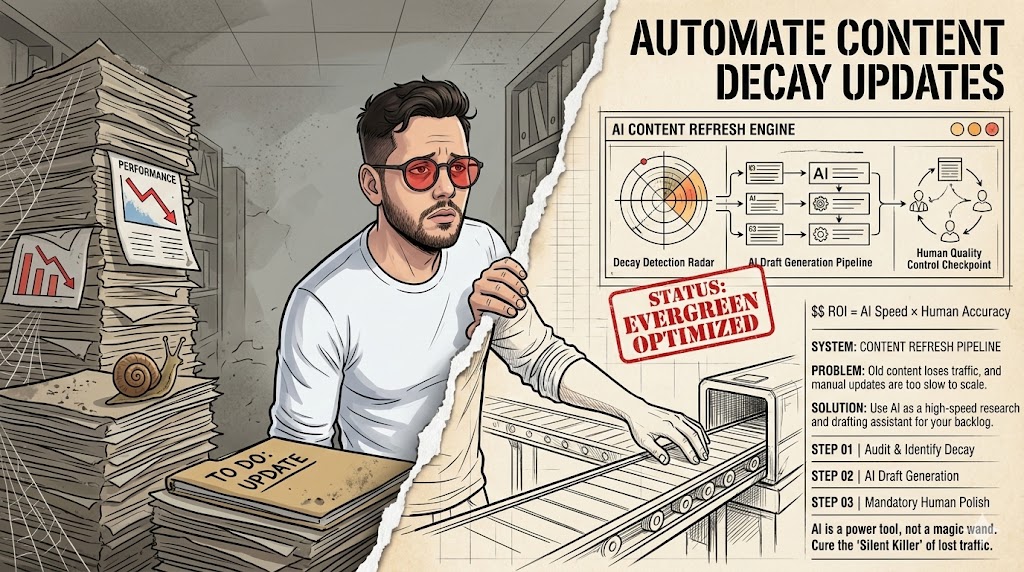


Blend AI with Human Refinement for Featured Images
No, pure AI images are not the best way. They often lack unique context and can feel generic, failing to truly represent your brand or content.
- Rapid concept visualization is a strong advantage.
- Risk of brand dilution is the biggest limitation.
- Best use case is for idea generation and human-edited drafts.
If your brand thrives on highly unique, authentic visuals, stop reading here.
AI Images vs. Curated Visuals for Blog Posts
| Criterion | AI-Generated | Curated/Custom |
|---|---|---|
| Use Case | Quick visual mockups. | Brand consistency / Unique storytelling. |
| Strengths | Speed, cost-effective (initially), infinite variations. | Authenticity, brand alignment, legal clarity. |
| Limitations | Often bland, legal grey areas, lack of true originality. | Time-consuming, higher upfront cost. |
The AI Image Trap: Why Generic Visuals Kill Your SEO
I once saw a client use AI images that looked like stock photos from 2008. Their bounce rate jumped. Your content fails when your featured image feels disconnected from the article’s core message. Generic AI images don’t build trust. Google’s E-E-A-T (Experience, Expertise, Authoritativeness, Trustworthiness) applies to visuals too. Readers scroll past blandness. It’s like putting a placeholder on a finished product. This hurts user engagement metrics. A high bounce rate signals disinterest. Search engines notice this. They might demote your content. Using a tool like Postlabs for content generation still needs human oversight for visuals.
The trap is thinking ‘good enough’ is actually good. It’s not. Generic visuals erode trust. They make your content look less professional. User engagement drops fast when images don’t resonate. This is a direct hit to your SEO efforts.
Warning: The "Good Enough" Trap
Relying solely on default AI outputs for featured images is a critical mistake. You risk appearing inauthentic and losing reader attention. This directly impacts your SEO performance.
Defining "Good" AI Images for Featured Posts
My team spent hours tweaking prompts for a single image. It had to convey "AI SEO automation" without looking like a robot. An AI image is "bad" when it fails to communicate your article’s unique angle. A "good" AI image isn’t just high-resolution. It must be relevant, unique, and brand-aligned. It should grab attention. It needs to convey the article’s core idea instantly. Think of it as a visual headline. It should make a reader curious. It needs to stand out in search results. This means avoiding common AI art styles. You want something that feels intentional. Not just a random output.
Relevance is key. If the image doesn’t immediately tell the story, it’s a miss. Uniqueness matters. It helps your content stand out in a crowded feed. This is especially true for competitive niches.
Featured Image Intent: The specific, strategic purpose a featured image serves to attract clicks, convey topic relevance, and reinforce brand identity within search results and social shares.
Why AI Images Can Help
- Rapid concept visualization for quick mockups.
- Cost savings on traditional stock photo subscriptions.
- Unique visual styles are possible with significant effort.
The Real Downsides
- Risk of generic, uninspired visuals that lack impact.
- Potential legal and ownership issues are a constant concern.
- Requires significant prompt engineering skill and time investment.
Prompt Engineering for SEO: Beyond "Pretty Picture"
I once used a prompt like "blog post about SEO" and got a literal blog post on a screen. Not helpful. Your prompts fail when they don’t include specific SEO and user intent signals. This isn’t about making "pretty" pictures. It’s about creating visuals that serve a purpose. Your prompts need to be detailed. They should include elements like "conceptual," "metaphorical," or "illustrative of [specific topic]." Think about the emotions you want to evoke. Consider the target audience. For example, "A minimalist illustration of data flowing into a brain, representing AI SEO automation, clean lines, digital art." This is far better than "AI brain." Tools like this complete AI guide emphasize prompt quality. It’s the difference between a snapshot and a commissioned piece.
Specificity in prompts is crucial. Vague instructions lead to bland results. Focus on intent, not just aesthetics. What message should the image convey? That’s your starting point.
The Unseen Costs: Licensing, Rights, and AI Image Ownership
I had a friend get a cease-and-desist letter. He used an AI image that too closely resembled a copyrighted character. It was a mess. You run into legal trouble when you assume AI-generated images are always free and clear for commercial use. This part sucks, honestly. Many AI image generators have murky terms. Some claim you own the output. Others retain rights. Some prohibit commercial use if the AI was trained on copyrighted data. This is a huge trap. If your featured image uses elements too similar to existing art, you could face legal action. This happened to a small blogger I know. They had to pull down dozens of posts. It cost them time, money, and a lot of stress. Always check the specific AI tool’s terms of service. Never assume full ownership. This is especially true for commercial blogs. A quick legal review can save headaches later. It’s not just about avoiding lawsuits. It’s about protecting your brand.
Always review AI tool terms. This is non-negotiable for commercial use. Legal clarity protects your brand. Don’t let a cheap image cost you thousands.
Myth
AI images are always copyright-free.
Reality
Ownership and commercial rights vary widely by platform. Many models are trained on copyrighted data, creating legal ambiguities for users. Always check the specific terms of service.
Optimizing AI Images for Speed and Search (The Technical Bits)
I once uploaded a 5MB featured image. My page speed score tanked by 20 points. Not fun. Your images hurt SEO when they slow down your page load or lack proper metadata. Speed matters. Google prioritizes fast-loading pages. AI-generated images can be huge files. You need to compress them. Tools like TinyPNG or ShortPixel are your friends. Aim for under 100KB for featured images. Use modern formats like WebP. This significantly reduces file size. Also, don’t forget alt text. It’s crucial for accessibility and SEO. Describe the image clearly. Include your target keyword if it fits naturally. For instance, "Minimalist illustration of AI SEO automation workflow." Not just "AI image." This helps search engines understand your content. It also helps visually impaired users.
Compress images aggressively. Page speed is a ranking factor. Write descriptive alt text. It’s vital for both SEO and accessibility.
Blending AI with Human Touch: The Hybrid Approach
We tried pure AI images for a month. Our brand felt sterile. Adding human edits changed everything. A purely AI-driven visual strategy fails to connect with users on an emotional level. This is where the magic happens. Don’t just take the AI output. Use it as a starting point. A human touch makes all the difference. Maybe you add a specific brand color overlay. Or a subtle texture. Perhaps you combine multiple AI elements. Then you refine them in Photoshop or Canva. This hybrid method gives you speed and uniqueness. It keeps your brand voice consistent. It prevents that "stock photo" feel. Think of AI as a powerful assistant. Not the sole creator. This approach helps maintain authenticity. It also ensures your visuals align with your overall content strategy.
AI is a starting point. It’s a tool, not a replacement. Human refinement adds authenticity. This is what truly makes your visuals stand out.
"The best AI content isn’t fully AI-generated; it’s AI-assisted, human-refined."
— General Consensus, Modern Content Strategy
Tracking Performance: What AI Images Actually Do for Your Posts
I once assumed a "cool" AI image was working. Analytics showed it had a higher bounce rate than a simple screenshot. You miss opportunities when you don’t measure how your AI images impact user behavior. Don’t just guess if your AI images are working. Track them. Look at click-through rates (CTR) from search results. Monitor bounce rates. Check time on page. Are users engaging more? Or are they leaving faster? A/B test different image styles. See what resonates with your audience. Google Analytics and Search Console are your friends here. A higher CTR from search can signal a more appealing image. This can boost your rankings. It’s all about user experience signals. If your images are driving engagement, keep doing it. If not, change your strategy.
Measure CTR and bounce rate. These are clear indicators of image effectiveness. A/B test image variations. It’s the only way to truly know what works for your audience.
Avoiding AI Image Detection Penalties (It’s Not What You Think)
I worried about "AI detection" for images. Turns out, Google cares more about quality and relevance. Your focus on "beating detection" distracts from creating genuinely valuable and relevant visuals. There’s a lot of chatter about Google "detecting" AI content. For images, it’s not about a magic detector. It’s about quality. Google wants helpful, relevant, and unique content. This includes visuals. If your AI image is generic, low-quality, or irrelevant, that’s the problem. Not that it’s "AI." Focus on making your images genuinely good. Make them unique. Ensure they add value to the post. Don’t obsess over "AI detection." Instead, obsess over user experience. Google’s algorithms are sophisticated. They understand context. They reward quality.
Focus on quality, not detection. This is the real secret. User experience is paramount. If users love it, Google will too.
My 2026 AI Image Workflow for Featured Content
I refined this process over two years. It saves me about 3 hours per post now. Your workflow stalls when you lack clear steps for integrating AI image generation. Here’s my current process for featured images. First, I outline the blog post. Then I identify the core concept. I brainstorm 3-5 visual metaphors. Next, I use an AI image generator (like Midjourney or DALL-E) with highly specific prompts. I generate 10-20 variations. I pick the top 3-5. Then I take them into Canva or Photoshop. I add branding elements. I refine colors and composition. Finally, I optimize for web. This means compression and alt text. This structured approach ensures quality. It also keeps things efficient. It’s about making AI work for you.
Structured workflow saves time. It brings consistency to your output. Refine AI output with human tools. This step is critical for brand alignment.
AI Image Workflow Audit (2026)
| Project/Item | Cost/Input | Result/Time | ROI/Verdict |
|---|---|---|---|
| Pure AI Image | $0-5/image | 10 min/image | Low engagement |
| Hybrid AI + Human | $5-15/image | 30 min/image | High engagement |
| Custom Design | $50-200/image | 1-3 hrs/image | Very high engagement |
What I Would Do in 7 Days
- Day 1: Audit your existing featured images for relevance and quality.
- Day 2: Choose one AI image generator and learn its advanced prompt syntax.
- Day 3: Practice generating 20 image variations for a single blog post concept.
- Day 4: Select the best 3-5 images and refine them with a human touch (e.g., Canva, Photoshop).
- Day 5: Optimize these refined images for web (compression, WebP conversion, alt text).
- Day 6: Publish one new blog post using your best hybrid AI-generated featured image.
- Day 7: Monitor its performance (CTR, bounce rate) for initial feedback and insights.
AI Image Readiness Checklist
- Is the image highly relevant to the article’s core topic?
- Does it avoid looking like a generic stock photo?
- Have you checked the AI tool’s licensing for commercial use?
- Is the image optimized for web (compressed, WebP format)?
- Does it have descriptive alt text with relevant keywords?
- Does it align with your brand’s visual style and guidelines?
- Are you prepared to track its performance in analytics tools?
Frequently Asked Questions About AI Images
Can AI images truly be unique?
Yes, with detailed prompt engineering and human refinement, AI images can be highly unique. They serve as a strong starting point for custom visuals that stand out.
Will Google penalize me for using AI images?
Google does not penalize content based on AI origin alone. Penalties arise from low-quality, irrelevant, or unhelpful content, regardless of how it was created. Focus on quality and user value.
How much time does a hybrid AI image workflow save?
In many observations, a hybrid workflow can reduce visual creation time by 50-70% compared to full custom design. This is while still maintaining high quality and brand alignment.